# Z reports - Verofy® transactions
This page describes what a Z report shows, and talks you through how to complete one on your Verofy® Move.
**We recommend you run a Z report, followed by a [reconciliation report](https://verofy.support/books/batching-reporting/page/reconciliation-reports-verofy-transactions) each day - to keep your Verofy® Move running smoothly.**
What is a Z report?
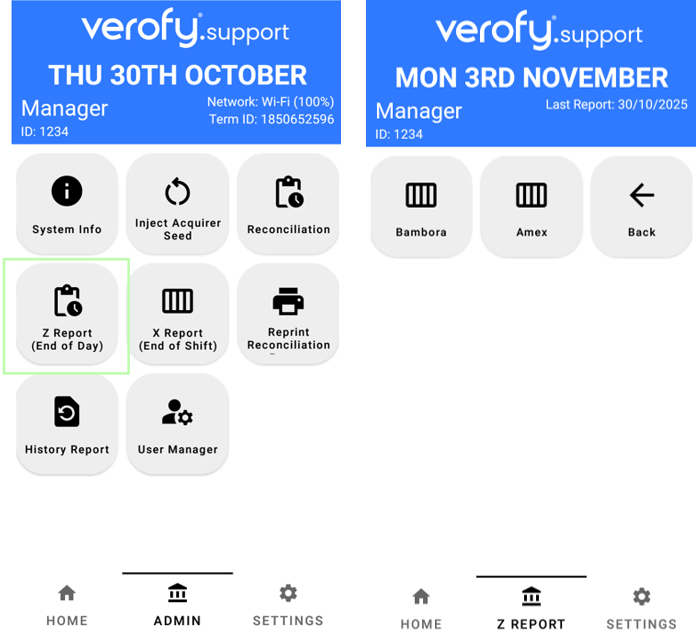
The Z report feature on your Verofy® Move can be found in the Admin menu on your terminal. It provides you with a **terminal summary** of the transactions volume and quantity taken on your Verofy® Move from the period of your last Z report to now.
If you have your Amex Merchant ID configured on your terminal, you'll see two options when you select the Z report (End of Day) button. For Verofy® transactions, you need to select the Bambora option. After a Z report is done, it 'resets' the totals on the terminal. It does not submit the transactions to the bank - this happens automatically after each transaction.
How does the Z report look?
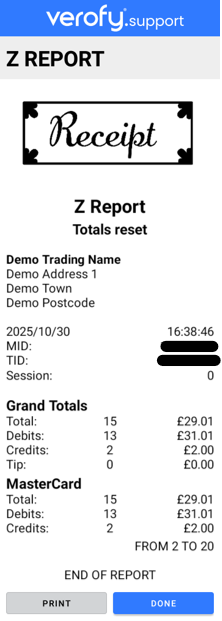
Here is an example of how the Z report will look. You'll see the **Grand Totals** of debits (sales) and credits (refunds) are shown. There is also a breakdown of the totals across Visa and Mastercard transactions (the example below had only taken Mastercard transactions during this period).
What is the best time to do a Z report?
We would recommend completing a Z report **after the last transaction** or **at the time of the banking window** (11:59PM GMT). This allows accurate reporting so you can easily compare the settled batches you receive with the figures on your Z reports.
Whilst the Z report gives you the **terminal summary**, we also recommend running the **[reconciliation report](https://verofy.support/books/batching-reporting/page/reconciliation-reports-verofy-transactions)** each day as this gives the **terminal summary** and compares this against what the acquiring bank totals are for this period.**
How often should you run a Z report?
Whilst there is no requirement to run a Z report everyday, we would recommend this as best practice.