# Dashboard Overview
If you're new to the Verofy® App, let us show you the ropes!
Here's a handy guide to show you where to find everything you'll need, straight from the dashboard.
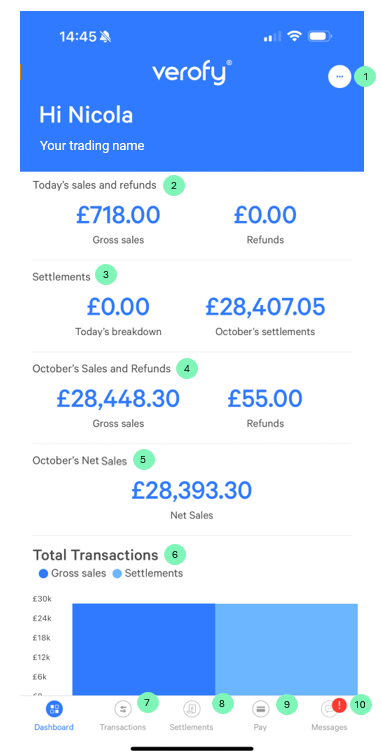
**1 - User menu:**
*From here, you can switch location or company if you have multiple businesses or locations, complete your Verofy® PCI+ compliance, view your company details and documents as well as updating your bank details. You can also manage push notifications, enable touch or face ID, and update your details such as PIN, mobile number and email address. You can also message our support team from this menu.* **2 - Today's sales and refunds:** *A top line summary of your total sales and refunds for the current day.* **3 - Settlements figures:** *A top line summary of your calculated settlement for the current day, along with a total figure for the current month (this is for any settlements we paid to you in the current month).*
**4 - October's sales and refunds:** *A top line summary of your total sales and refunds for the current month.*
**5 - October's Net Sales:**
*A top line summary of the net sales for the current month (this is total sales minus any refunds).*
**6 - Total transactions:** *A bar chart showing gross sales and settlement figures for the current month.*
**7 - Transactions:** *Here you can view your real time transactions and see transaction data from a specified date range.*
**8 - Settlements:** *Here you can view your daily and monthly settlements, see breakdowns and view, download and share the PDF files with your settlement information.*
**9 - Pay:** *If you have any vPayment products (Verofy® Virtual Terminal or Verofy® PayLinks), here's where you can access them.*
**10 - Messages:** *If you need to contact us for support, you can use the message centre. From here, you can raise support requests. You can still call us if you prefer - on 0330 460 4672 and our support team will be happy to help.*