# Viewing a specific transactions detail in the Verofy® App
You can easily view the detail about a specific transaction from the Verofy® App by clicking into a transaction record once you've located it. If you need help finding a specific transaction in the Verofy® App, click **[here](https://verofy.support/books/navigating-verofy-app/page/finding-a-specific-transaction)**.
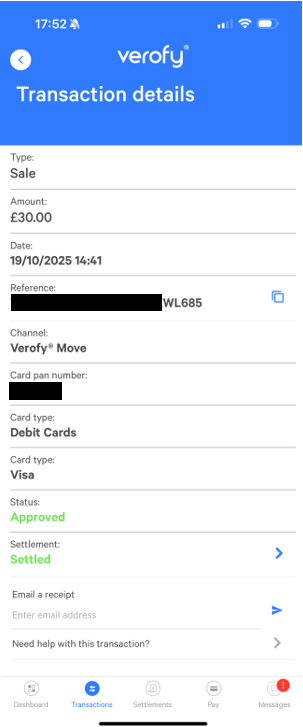
From here, you can **[view the settlement ](https://verofy.support/books/navigating-verofy-app/page/view-the-settlement-a-transaction-relates-to)**the transaction relates to, [**email a copy of the receipt to your customer**](https://verofy.support/books/navigating-verofy-app/page/email-a-receipt), or [**request support for the transaction**](https://verofy.support/books/navigating-verofy-app/page/request-support-for-a-transaction).