
Switch the company or location you're viewing
If you have multiple businesses using our services that trade under different entities (i.e., each one has it's own Limited Company), this will show you how to switch between each company in the Verofy® App.
If you have multiple businesses under different entities:
- Start by logging into the Verofy® App, then pressing the ... button at the top right of the screen.

- From here, select the grey arrow next to the Company you're currently logged into. You'll see a list of all the different the companies, and you can select which one you want to view. The app will then update to display the information about this specific business.
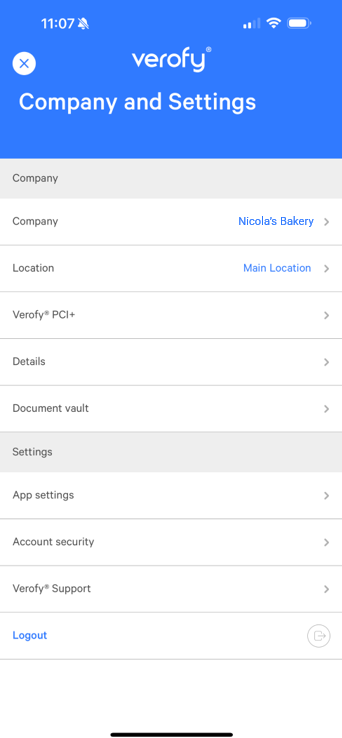
If you have multiple locations of your business under the same legal entity:
- Start by logging into the Verofy® App, then pressing the ... button at the top right of the screen.

- From here, select the grey arrow next to the Location you're currently logged into. By default, the App will display the Main location. You'll see a list of all the different the companies once you click the arrow, and you can select which loation you want to view. The app will then update to display the information about this specific location.
If you're having issues locating the business or location for your business you need to view, get in touch and we can support you further.